When sending an email in Outlook, you may see the following message:
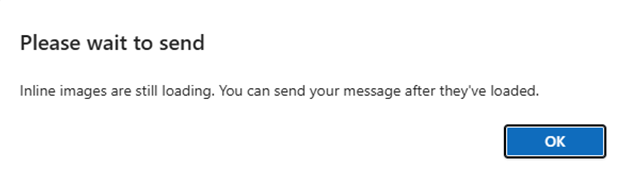
This can occur when using the Crossware Outlook Add-in for client-side signatures.
Cause
This message is generated by Microsoft Outlook and is not specific to Crossware. It typically appears when Outlook is still processing the email content or add-ins before the message is sent.
For more information, refer to Microsoft's documentation on known Office Add-ins issues: Office Add-ins known issues | Microsoft Learn
Resolution
In most cases, this message will disappear after a few seconds once Outlook has finished processing the email.
We recommend the following:
Wait for the signature to fully load
Before clicking Send, ensure that the signature and any inline images have fully loaded in the message body.
Check your internet connection
A slow or unstable connection may delay Outlook while loading images or processing add-ins.
If you are connected to a VPN, try temporarily disconnecting and test again.
Reduce the number of images in signatures
Large or multiple images can increase loading times. Consider:
-
Using fewer images
-
Reducing image resolution
-
Avoiding unnecessary banners or large graphics
-
Using linked images instead of embedded images where possible
Review Outlook Offline settings
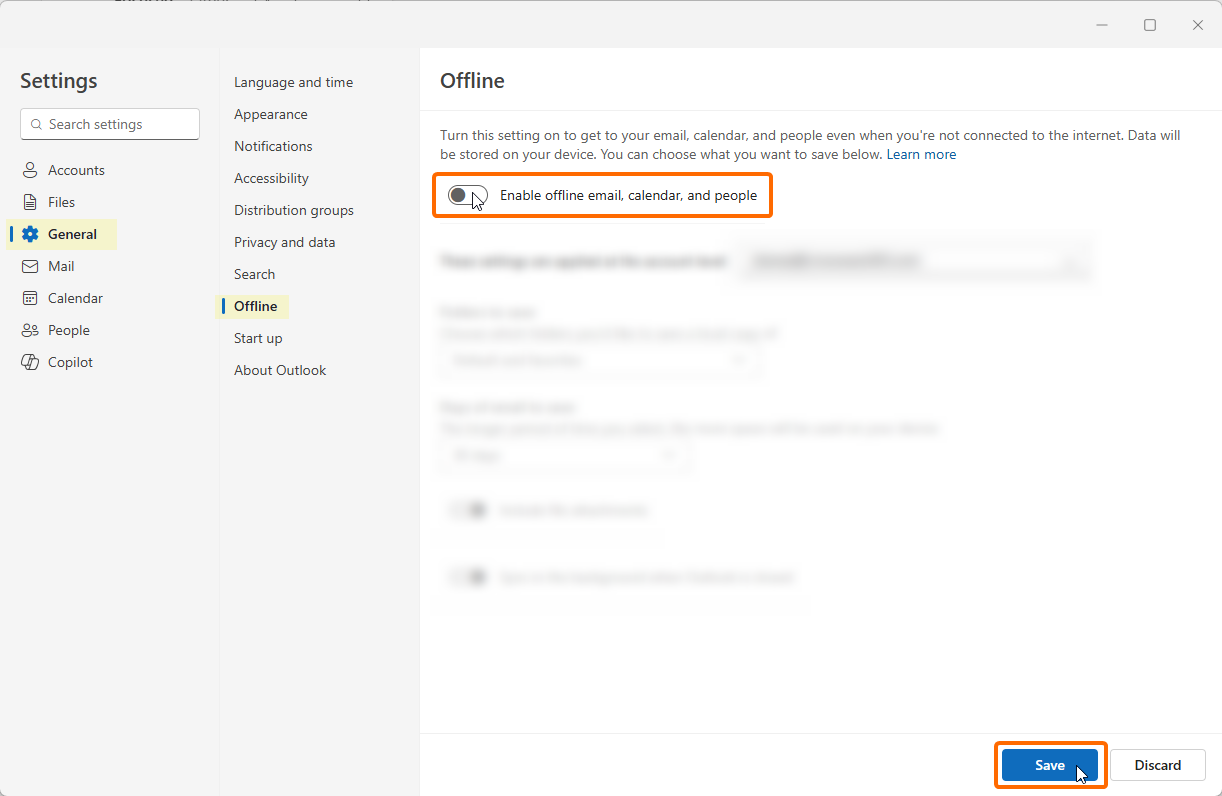
Some users have reported delays caused by Offline Mode in New Outlook. Disabling Offline Mode may help in certain environments.
Steps
-
Go to Settings.
-
Navigate to General > Offline.
-
Turn off Enable offline email, calendar, and people.
-
Click Save.
-
Return to the same setting and turn Enable offline email, calendar and people back on.
-
Click Save again.