
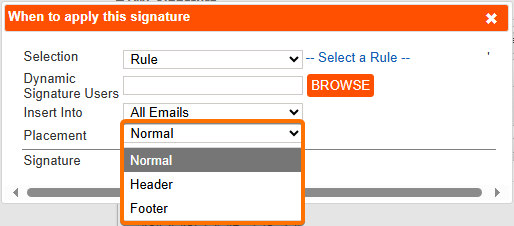
The placement of a signature on replies or forwarded emails is controlled by the Signature Placement setting in the Signature Configuration document.
You can choose to insert the signature:
-
Normal – before the start of the reply or forwarded email (just after your message).
-
Header – at the top of the entire email.
-
Footer – at the very end of the email chain.
How replies and forwards are detected
When the Signature Placement setting is configured as Normal (to insert the signature at the end of the current email, before any previous messages in a reply or forward), Crossware Email Signature must detect where the new content ends and the older message begins.
The application searches for markers within the email to identify the start of the previous message.
For example,

MIME format emails
-
In MIME replies and forwards, the marker is identified by specific text strings.
-
For example,

-
-
If a customised mail template is used, or if the template is in a language other than English, these markers may not be detected correctly.
-
For MIME emails in plain text format (text/plain), there may be no clear marker. In such cases, the signature may be placed at the end of the entire email chain.