
The recommended way to install Crossware Email Signature is to simply run the downloaded executable.
If this consistently fails at certain points, then a manual install may be necessary by following these steps:
-
YOU MUST run the installer; this should at least get as far as creating the esig.nsf on the server. If this cannot be done, then check you have the necessary permissions to create a database on the server.
-
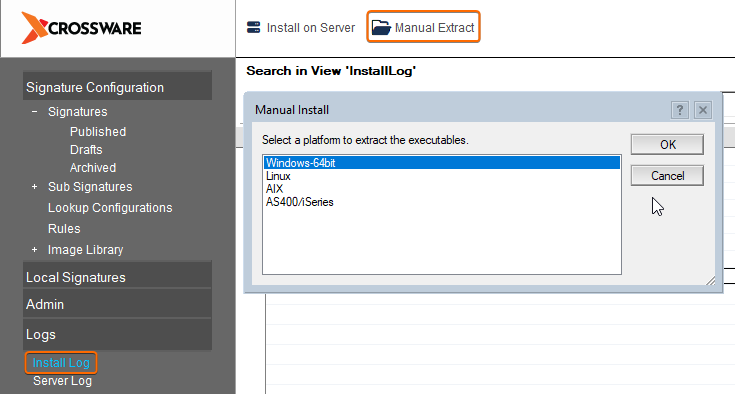
Open the newly created esig.nsf (there should be an icon in the workspace) and click Install Log
-
Along the top menu bar select Manual Extract. Select the Domino data directory to move the extracted files to, if you cannot access this directory then select a temporary destination at this time and move them later.
-
The next step is to alter your server notes.ini. The following variable needs to be added:
For Windows
EXTMGR_ADDINS=signature4_xxx.dll
NOTE: If this variable exists, then append the value to the end for example EXTMGR_ADDINS=decsext,signature4_xxx.dll
Take special care of the versioning of the DLL. the 'xxx' must match the file just copied e.g. signature4_00.dll
For Linux/AIX/Solaris
EXTMGR_ADDINS=signature
For iSeries
EXTMGR_ADDINS=sig
-
Save the notes.ini file and reboot the server. As the server starts there will be various screen messages explaining the product is now installed.